www.DQFanFeedback.com is a Dairy Queen customer satisfaction survey page for customers with a recent DQ receipt or coupon. The standard entry screen asks for the restaurant’s 10-digit phone number, your visit date, and your visit time.
If your receipt has a survey code instead, do not force it into the phone-number form. Dairy Queen uses more than one survey entry format. The safest rule is simple. Use the website, code format, deadline, and reward instructions printed on your own receipt.
Independent guide
DQFanFeedback.net does not operate the Dairy Queen survey and cannot issue survey or validation codes. Use the official survey page printed on your receipt to submit feedback.
What Is the DQFanFeedback Survey?
The DQ Fan Feedback survey is Dairy Queen’s official customer satisfaction survey. After a visit, guests rate things like:
- How fast the order was taken and served
- Whether the food was the right temperature
- How the Blizzard or cone tasted and looked
- How friendly the crew was
- How clean the dining room and restrooms were
Franchise owners use these answers to see what their store does well and what needs fixing. You get a validation code at the end, and you redeem it at your next visit for the offer printed on your receipt.
Which Dairy Queen Survey Page Should You Use?
Match the information on your receipt with the entry screen. This prevents most code and phone-number errors.
| What your receipt provides | Where it belongs | What you enter |
|---|---|---|
| 10-digit restaurant phone number | DQFanFeedback.com | Phone number, visit date, and visit time |
| No 10-digit number but a 15-character code | DQFanFeedback alternate entry | 15-character survey code |
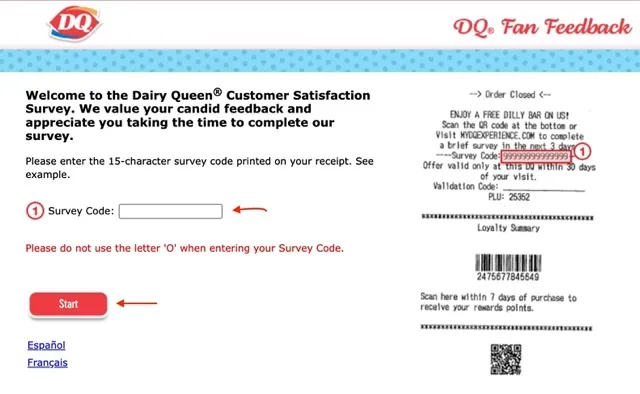
| MyDQExperience.com | MyDQExperience | 15-character survey code |
| DQFanSurvey.com | DQFanSurvey | 19-digit survey code |
| QR code | Follow the QR route first | Use the entry method shown after scanning |
The 10-digit number requested by the main DQFanFeedback form is the restaurant phone number printed on the receipt or coupon. It is not a 10-digit survey code.
DQFanFeedback uses the restaurant phone number
The standard DQFanFeedback entry asks for the 10-digit restaurant phone number plus the date and time of your visit. Do not automatically enter your own mobile number.
MyDQExperience uses a 15-character survey code
Some receipts direct customers to MyDQExperience. Its entry form uses a 15-character survey code. The form also warns users not to use the letter O when entering the code.
If your receipt points to MyDQExperience, use that route instead of trying to fit its code into the standard DQFanFeedback phone-number fields. For more detail, read our MyDQExperience survey guide.
DQFanSurvey uses a 19-digit survey code
A separate Dairy Queen survey page at DQFanSurvey.com uses a 19-digit survey code. If your receipt points to that site, use the 19-digit form shown there.
What Do You Need Before Starting the DQFanFeedback Survey?
- A recent Dairy Queen receipt with the survey invitation printed on it
- The restaurant’s 10-digit phone number printed on that receipt (or the survey code, if your receipt shows one instead)
- The date and time of your visit, which are also on the receipt
- A device with internet access, like a phone, tablet, or laptop
- A pen, so you can write the validation code on the receipt
Most receipts give you only a short time to finish the survey and redeem the offer. The deadline is printed on the receipt, so check it before you start.
Check Your Dairy Queen Receipt Before You Start
Your receipt is the most important part of the process. Keep it beside you until the survey and any reward steps are finished.
| Receipt detail | Why it matters |
|---|---|
| Survey website | Tells you which entry form to use |
| Restaurant phone number | Used by the standard DQFanFeedback screen |
| Survey code | Used by code-based entry forms |
| Visit date | Required on the standard DQFanFeedback screen |
| Visit time | Required on the standard DQFanFeedback screen |
| Survey deadline | Tells you when the invitation expires |
| Reward wording | Tells you what your specific offer includes |
| Redemption deadline | Tells you when the reward must be used |
| Location restrictions | Shows where the offer may be accepted |
A photo can help preserve faded receipt information. Keep the original receipt as well if the printed offer says you must present it when redeeming a reward.
How Do You Take the Survey at www.DQFanFeedback.com, Step by Step?
- Go to the official site. Type www.dqfanfeedback.com into your browser. Look-alike sites exist, so make sure the address is exactly right.
- Pick your language if the site offers more than one.
- Enter the restaurant phone number. Type the 10-digit restaurant phone number printed on your receipt, not your personal phone number.
- Enter your visit date and time. Match the month, day, year, hour, minutes, and AM or PM exactly as shown on your receipt.
- Rate your visit. Answer each question on the satisfaction scale. Be honest, because good and bad feedback both help the store.
- Write a short comment. Name something specific, like a slow drive-thru, a perfect Blizzard, or a crew member who helped you. Specific comments are the ones that reach the manager.
- Get your validation code. Write it on your receipt right away.
- Bring the receipt back to Dairy Queen. Redeem it before the expiration date to get your treat.
What If There Is No 10-Digit Phone Number?
Use the alternate entry option provided on DQFanFeedback.com. The official survey includes a route for customers whose receipt does not show a 10-digit phone number. That alternate form asks for a 15-character survey code.
Do not invent a phone number or use your own number just to get past the first screen. If your receipt has the 15-character code, enter it exactly as printed.
The code-entry form warns users not to use the letter O. Check similar-looking characters carefully if the code is rejected.
Where Is the Dairy Queen Survey Code?
Not every DQ receipt uses the same survey code. Some do not begin with a code at all.
| Entry type | Format | Used for |
|---|---|---|
| Restaurant phone number | 10 digits | Main DQFanFeedback entry |
| Survey code | 15 characters | DQFanFeedback alternate entry |
| Survey code | 15 characters | MyDQExperience |
| Survey code | 19 digits | DQFanSurvey |
| Validation code | Varies | May be provided after survey completion |
The easiest rule is to use the website and entry format printed on the same receipt. Do not copy a code from one receipt into a form designed for another survey route.
DQFanFeedback and MyDQExperience Use Different Starting Forms
Both pages are used for Dairy Queen customer feedback, but their starting forms are different.
| Feature | DQFanFeedback | MyDQExperience |
|---|---|---|
| Main first-screen entry | 10-digit restaurant phone number | 15-character survey code |
| Date on first screen | Yes | No |
| Time on first screen | Yes | No |
| 15-character option | Yes, through alternate entry | Yes, main entry |
| Spanish option | Yes | Yes |
| French option | Yes | Yes |
The safest choice is always the survey page named on your receipt.
What Is the 19-Digit DQFanSurvey Code?
DQFanSurvey.com uses a 19-digit survey code printed on eligible receipts. If your receipt specifically points to DQFanSurvey, use that form.
Do not enter a 19-digit code into the 10-digit phone-number fields at DQFanFeedback.com. It is also different from the 15-character code used by MyDQExperience.
Survey Code and Validation Code Are Different
A survey code helps you start a code-based survey. A validation code may be provided after you finish when a particular receipt promotion requires one.
| Term | When you use it | Purpose |
|---|---|---|
| Survey code | Before the survey | Opens a code-based questionnaire |
| Restaurant phone number | Before the survey | Starts the standard DQFanFeedback route |
| Validation code | After completion, when provided | May be connected with a receipt reward |
| DQ Rewards barcode | Loyalty process | Used for DQ Rewards, not DQFanFeedback |
The survey code helps you start. A validation code may help you redeem an offer after you finish.
What Reward Do You Get?
The reward depends on the store and the current promotion, and the exact offer is printed on your receipt. Past offers have included a free Dilly Bar, or a buy-one-get-one Blizzard or cone with a purchase.
Usual conditions:
- One validation code per receipt
- One redemption per guest per visit
- Must be used at a participating Dairy Queen location
- Can’t be exchanged for cash or combined with other coupons
For more details, see our Dairy Queen Free Dilly Bar guide and DQFanFeedback rewards guide.
How Long Do You Have to Complete the DQFanFeedback Survey?
Use the deadline printed on your own Dairy Queen receipt. Do not assume one fixed time limit applies to every survey invitation.
There can also be two different deadlines.
| Deadline | Meaning |
|---|---|
| Survey deadline | Last date to submit your feedback |
| Reward deadline | Last date to redeem an offer after completion |
Those dates may not be the same. Completing the survey sooner also reduces problems caused by faded receipts or forgotten visit details.
What Questions Does the Dairy Queen Survey Ask?
The exact questionnaire can change, but the questions focus on the visit connected with your receipt.
| Topic | What it may cover |
|---|---|
| Food quality | Taste, freshness, and temperature |
| Order accuracy | Correct items and customizations |
| Service speed | Counter, pickup, or drive-thru wait |
| Staff interaction | Courtesy and helpfulness |
| Cleanliness | Dining area, counter, or restroom |
| Value | How the visit felt for the price paid |
| Overall satisfaction | Your general impression of the visit |
Specific feedback is more useful than a vague comment. For example, “My fries were missing from the order” gives clearer context than simply writing “bad service.”
Why Is My DQ Survey QR Code Not Working?
Dairy Queen provides a fallback for this problem. If a QR code or 15-character survey code gives an error, the company says to use the option that asks for the restaurant’s 10-digit phone number, which can usually be found near the top of the receipt.
If the problem continues, Dairy Queen recommends using its Contact Us form and including a photo of the receipt.
How Do You Fix DQFanFeedback Problems?
Use this table before giving up on the survey.
| Problem | Check first |
|---|---|
| Phone number rejected | Confirm all 10 digits from the receipt |
| Date rejected | Match the exact receipt date |
| Time rejected | Check hour, minutes, and AM or PM |
| No 10-digit phone number | Use the official alternate 15-character entry |
| 15-character code rejected | Recheck every character and do not use the letter O |
| QR code gives an error | Use the official phone-number fallback |
| 19-digit code does not fit | Check whether the receipt directs you to DQFanSurvey |
| Wrong survey page | Return to the website printed on the receipt |
| Old receipt | Check the printed survey deadline |
| Reward question | Read the exact offer on the receipt |
| Lost receipt | Contact the location or Dairy Queen support for general feedback |
| DQ Rewards points missing | Use DQ Rewards support instead of survey troubleshooting |
One common mistake is mixing information from two different receipts. The phone number, visit date, time, and survey invitation should all belong to the same transaction.
What if DQFanFeedback.com will not load?
First make sure you entered the correct survey address. Reload the page or open it in another current browser. If browser translation is changing the form, turn it off temporarily and use the language options built into the survey.
If the page opens but the receipt information still fails, treat it as an entry-information problem rather than a browser problem.
Can You Take DQFanFeedback on Your Phone?
Yes. DQFanFeedback is a web survey, so you can use a browser on a phone, tablet, or computer. You do not need a separate DQFanFeedback app.
The official DQ App is different. It is used for ordering and the separate DQ Rewards loyalty program.
DQFanFeedback and DQ Rewards Are Different
Both systems can involve a Dairy Queen receipt, but they have different purposes.
| DQFanFeedback | DQ Rewards |
|---|---|
| Customer satisfaction survey | Loyalty program |
| Uses survey receipt information | Uses a DQ Rewards account and loyalty details |
| Collects feedback | Earns and redeems points |
| May have a receipt-specific promotion | Has separate points and offers |
| No normal account login needed to begin | Uses the DQ App or DQ.com account |
Dairy Queen currently states that DQ Rewards members earn 10 points for every $1 spent on qualifying purchases at participating locations. The app also has its own receipt process for eligible loyalty transactions. That is separate from the customer survey.
Can You Use DQFanFeedback.com in the US and Canada?
The current official DQFanFeedback survey identifies itself for customers in the United States and Canada.
Receipt formats, promotions, and franchise participation can still differ by location. Use the survey website and terms supplied by the restaurant you visited.
If you received a Dairy Queen receipt in another country, do not assume that the same portal, code format, or reward rules apply.
Is DQFanFeedback Available in Spanish and French?
Yes. The current DQFanFeedback entry screen provides Español and Français options in addition to English. The related code-entry pages also provide language options.
Choose the language you understand best before beginning the questionnaire.
Who Operates the Dairy Queen Survey?
The official DQ survey pages display SMG, Service Management Group, in the footer and link to SMG terms and survey privacy information.
SMG says it operates surveys for brand partners and conducts market research to help those brands understand customer preferences and experiences. You can review its survey privacy policy before submitting feedback.
Avoid putting unnecessary private information into an open comment box. Do not submit passwords, banking details, or unrelated personal data.
Why Does Dairy Queen Collect Customer Feedback?
Dairy Queen says customer feedback helps franchise owners and the company understand product and service experiences. For a problem tied to one specific restaurant, contacting that location directly can also help.
Useful feedback explains what happened. “Drive-thru took 20 minutes even though only two cars were ahead of me” gives more context than “too slow.”
The same is true for positive feedback. Explain what the employee or restaurant did well.
How Do You Contact Dairy Queen About a Survey Problem?
If the survey still does not work after you check the receipt and entry format, use Dairy Queen’s official Contact Us page.
For QR-code or 15-character-code problems, Dairy Queen recommends including a photo of the receipt when contacting support.
Dairy Queen also lists 1-866-793-7582 for Fan Relations in its official support materials.
Common Questions About DQFanFeedback
What is www.DQFanFeedback.com?
It is a Dairy Queen customer satisfaction survey page. The standard entry asks for the restaurant’s 10-digit phone number plus the date and time of the visit.
Is the 10-digit number a survey code?
No. The standard DQFanFeedback page describes it as the 10-digit phone number printed on your receipt or coupon.
What if my receipt has a 15-character code?
Use the 15-character route shown by your receipt. DQFanFeedback has an alternate 15-character form, and MyDQExperience also uses a 15-character survey code.
What if my receipt has a 19-digit code?
Check whether it directs you to DQFanSurvey.com. That survey route uses a 19-digit receipt code.
Does the Dairy Queen survey always give a free Dilly Bar?
No universal reward should be assumed. Follow the reward wording, deadline, and restrictions printed on your own receipt.
Can I take the survey without a receipt?
The current entry methods require receipt or coupon information such as the restaurant phone number, visit details, or a printed survey code.
Is DQFanFeedback the same as DQ Rewards?
No. DQFanFeedback is a customer survey. DQ Rewards is Dairy Queen’s separate loyalty program.
What should I do if the survey still does not work?
Check the website and receipt information first. If a QR code or 15-character code fails, try the official 10-digit restaurant phone-number fallback. If the problem continues, contact Dairy Queen and include a receipt photo.
Related Dairy Queen Survey Guides
If your receipt sends you to MyDQExperience, use our MyDQExperience survey code and receipt guide.
If your receipt specifically offers a Dilly Bar, read our Free Dilly Bar receipt guide.
If it offers a Mini Blizzard instead, see our Free Mini Blizzard guide.
For broader offer and redemption questions, see our DQFanFeedback rewards guide.
Final Receipt Check
The standard DQFanFeedback route uses the 10-digit restaurant phone number, visit date, and visit time. If there is no 10-digit phone number, DQFanFeedback provides an alternate 15-character survey-code route. MyDQExperience also uses 15 characters, while DQFanSurvey uses 19 digits.
Keep your receipt until you finish the survey. Follow its deadline and reward wording exactly. If a QR code or survey code does not work, use Dairy Queen’s official fallback or support route rather than guessing another entry format.
Editorial note
Fact-checked October 2, 2026. DQFanFeedback.net is an independent informational guide. It is not Dairy Queen, DQFanFeedback.com, MyDQExperience.com, DQFanSurvey.com, or Service Management Group.
For this update, entry formats were checked against the live DQFanFeedback, alternate-code, MyDQExperience, and DQFanSurvey pages. Troubleshooting and franchise information were checked against Dairy Queen’s official support pages. Receipt-specific terms can change, so your current receipt and the live official survey instructions take priority.
Official references DQFanFeedback · MyDQExperience · DQFanSurvey · Dairy Queen FAQ · SMG Survey Privacy